
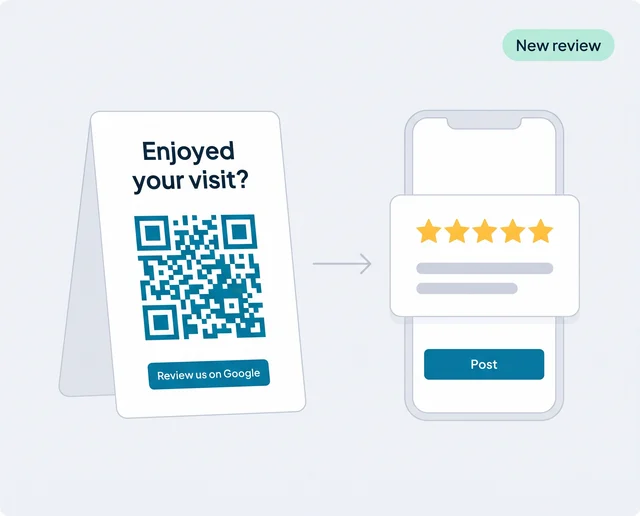
Where reviews get lost
Most local businesses don't have a review problem; they have an asking problem. Customers who enjoyed their visit would leave a review, but something gets in the way:
- Nobody asksThe team is busy, the moment passes and the customer walks out. One person asking only on their good days isn't a system.
- The review form is hard to findCustomers have to search your business on Google, find the profile and tap "Write a review". Every extra step loses people.
- It happens later, or never"I'll do it tonight" rarely happens. A review asked for a week after the visit competes with everything else in the customer's inbox.
- Customers need a Google AccountGoogle only accepts reviews from signed-in users. Someone without an account gives up unless you tell them they can create one with any email address.
Review generation fixes those four gaps with the same three things: a quick way to reach your review form (a QR code or link), a fixed moment to offer it, and a way to see which of your cards and links actually work.
How the review generation tool works
Here is what a customer goes through after they scan your card or tap your link:
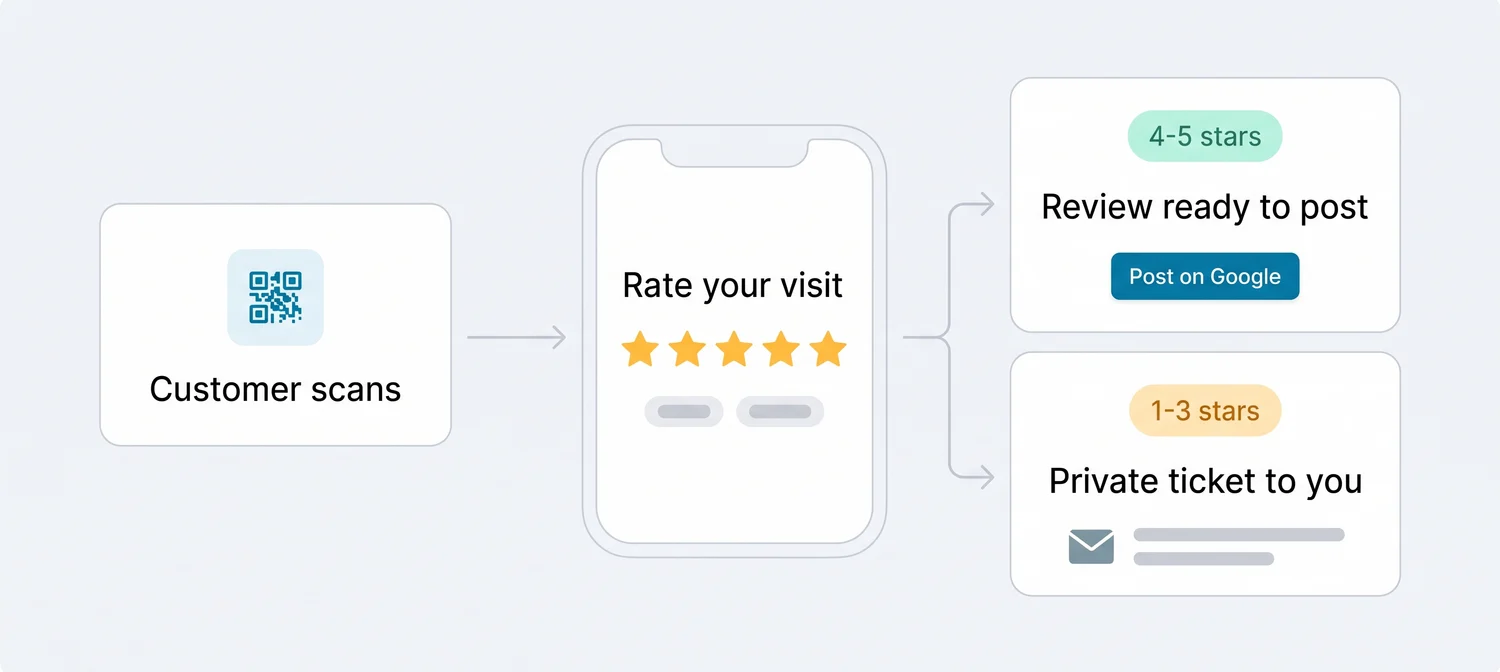
The survey has your colours, logo and wording. The customer rates the visit and taps a few highlights, such as "friendly staff" or "quick service", and the AI turns those into a short review they can post on Google in their own name. A customer who rates you low doesn't see that step. Their feedback reaches you as a private ticket, with an email straight away, so you can reply, keep notes and mark it resolved once it's sorted.
If you'd rather skip the survey, any card or link can go straight to your Google review form instead. You choose per card.
Connect your Google Business Profile
Sign in with the Google account that manages your profile. Reviews and replies sync from there.
Build your survey
Add your logo and colours, write the question in your own words and pick the highlights customers can tap.
Design and print your cards
An A6 table card, a business card or an A4 sign for an acrylic stand, as PNG, SVG or print-ready PDF.
Paste your link where customers already read
Booking confirmations, invoices, follow-up emails and your website.
Online review generation: where to put your QR code and link
Online review generation works best when the request meets the customer where they already are. Each place has its own best moment:
| Where | Best moment | Works well for | What to use |
|---|---|---|---|
| Table or counter card | While they wait for the bill or their order | Restaurants, cafés, salons, shops | A6 table card with QR code |
| Front desk sign | At checkout or key handover | Hotels, clinics, gyms, car repair | A4 sign in an acrylic stand |
| Business card | After a home visit or a sales meeting | Trades, real estate, consultants | Business card with QR code on the back |
| Invoice or receipt | When the job is paid | Trades, workshops, B2B services | Your review link or a printed QR code |
| Booking confirmation or follow-up email | The day after the visit | Anything with appointments | Your review link in one sentence |
| Your website | When a visitor is already reading about you | Every business | A "Write a review" button, or the rating badge |
Two tips that make the difference. First, ask at the counter but let the customer decide when to scan; Google doesn't want businesses pressuring people to review on the spot, and a card does the asking for you. Second, use a separate card or link for each place, so the scan counter tells you whether the table card or the invoice link brings in more feedback.
Need a link or a printable code right now? The free Google review link generator, Google review QR code generator and review card maker work without an account.
Review generation strategy: a 30-day plan
A review generation strategy doesn't need to be complicated. It needs to be the same every day. Here's a plan for the first month:
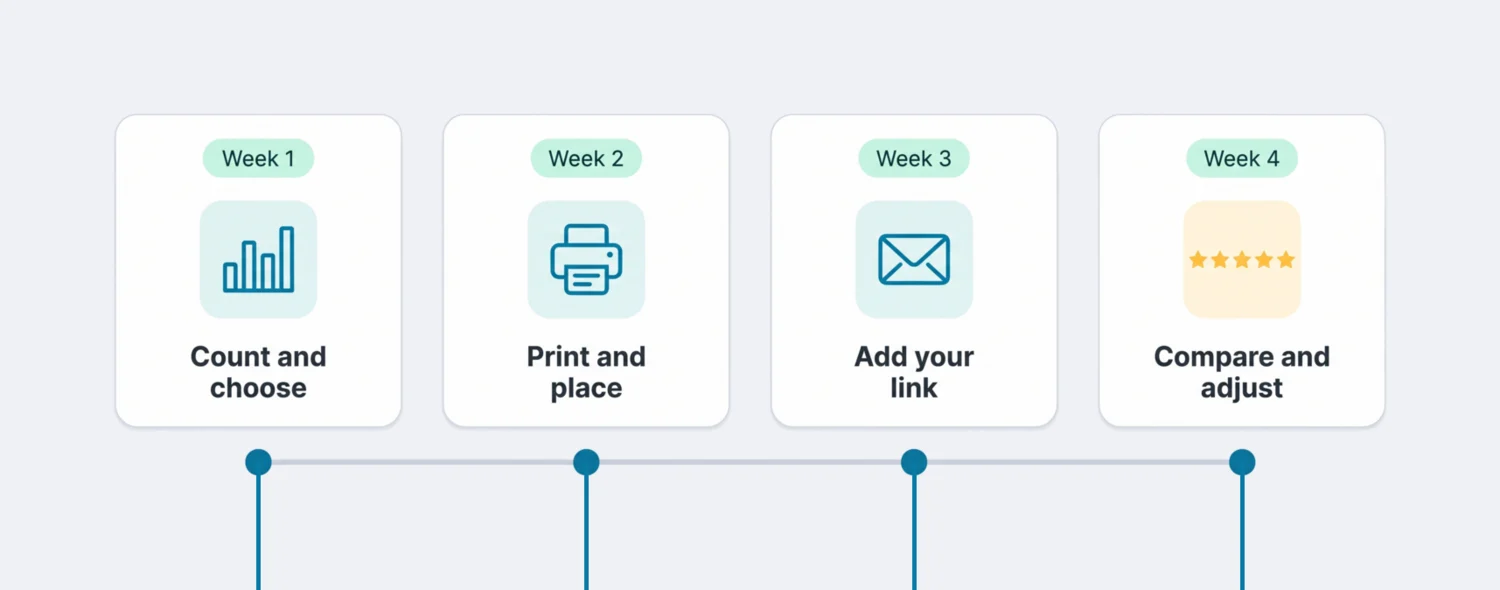
Week 1: count and choose
Note your review count and rating, then pick two or three places to ask.
Week 2: print and place
Put the cards out and agree one friendly sentence. No targets per person.
Week 3: add your link
Add your review link to confirmations, invoices and follow-up emails.
Week 4: compare and adjust
Keep the card scanned most, move the weakest and read the private tickets.
Fewer places done every day beat many places done now and then. For the numbers in week 1, the free Google review calculator shows how many 5-star reviews it takes to reach your target rating.
Card wording that works
- Restaurant table card"Enjoyed your meal? Scan to tell us, it takes 30 seconds."
- Salon mirror card"Love your new look? We'd love to hear about it on Google."
- Trades invoice"Thanks for choosing us. If the job went well, a short Google review helps other homeowners find us: [link]"
- Hotel key card holder"How was your stay? Scan to rate it before you check out."
More wording for emails, texts and signs is in our review request templates, and our guide to creating a Google review card covers sizes and design.
Generating reviews the way Google allows
Asking for reviews is allowed and Google encourages it: its own help pages suggest sharing a link or QR code. The rules are about what you give in return and who writes the review:
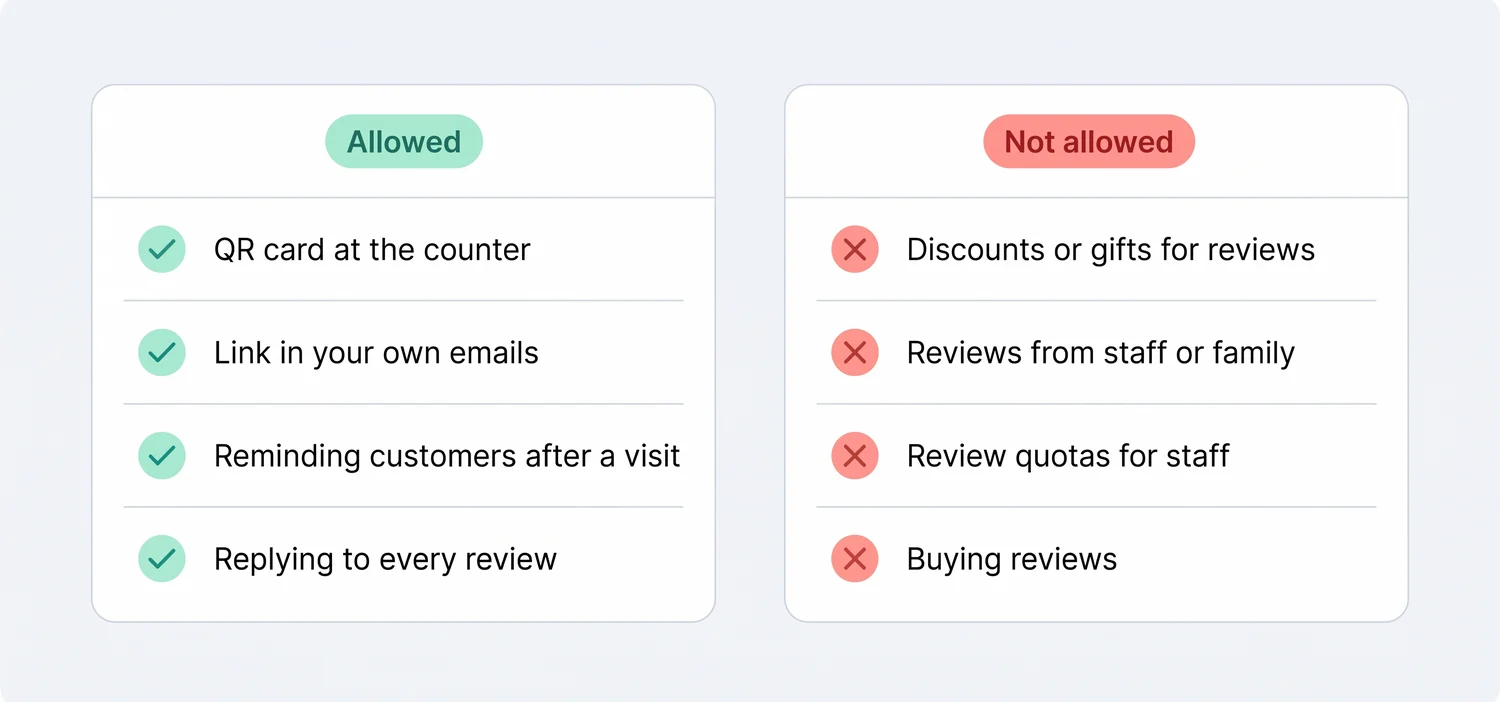
Two of these surprise many owners. Google counts reviews from current or former employees, relatives and business partners as a conflict of interest, even if they really did buy from you. And it treats staff review quotas ("five reviews per person this week") as rating manipulation, so reward your team for good service, not for review counts.
A word on names. Search "review generator" and you'll find AI tools that write fake reviews. That's the opposite of a review generation tool: Google removes content that isn't based on a real experience, and in the US the FTC's rule on consumer reviews bans buying or writing fake ones. If a company offers to post reviews for you, the answer is no, however it's worded.
Also expect a small delay. Google checks new reviews against its policies, which can take a few days, so a review a customer just posted may not show up straight away. That's normal, not a fault in your link.
Review generation service or review generation software?
When people search for a review generation service, they usually mean one of three things:
| Do it yourself | Review generation software | Review generation service (agency) | |
|---|---|---|---|
| What you pay | Staff time | A monthly subscription | A monthly retainer, often several times a software plan |
| Who asks customers | Whoever remembers | Your cards, survey and links, every day | The agency's text and email campaigns |
| Who owns the customer contact | You | You | Often the agency's sender name or number |
| Unhappy customers | You hear about them in the review | They reach you privately first | Depends on the agency |
| Replies to reviews | Written by you | AI drafts, approved by you or posted automatically | Often written by the agency |
| Watch out for | It stops when it gets busy | Needs someone to put the cards out | Promises of "guaranteed" review counts or removals |
Software is the right fit when customers visit you in person or you already send them emails, and you want to keep the message in your own voice. An agency makes sense when you have a large customer list and no one to run campaigns. Either way, if someone guarantees a number of new reviews per month, ask how. Only real customers can write a Google review, and only Google can remove one.
Collect Google reviews and answer them in one place
Getting reviews is half the job. Once they start coming in, Scan And Review helps you answer and learn from them:
- Review cards and linksCards in your design in three print sizes, plus review links for emails and invoices. Each code leads to your survey or straight to Google.
- Surveys and private ticketsHigh ratings get a ready review for Google; low ratings reach you as a ticket you can reply from, add notes to and resolve.
- AI replies to every reviewA reply in the reviewer's language for each new Google review, posted automatically for the star ratings you choose, or after you approve it if you prefer.
- Google Business OptimizerYour Google Business Profile checked every morning and scored out of 100, with written fixes that go live only after you approve them.
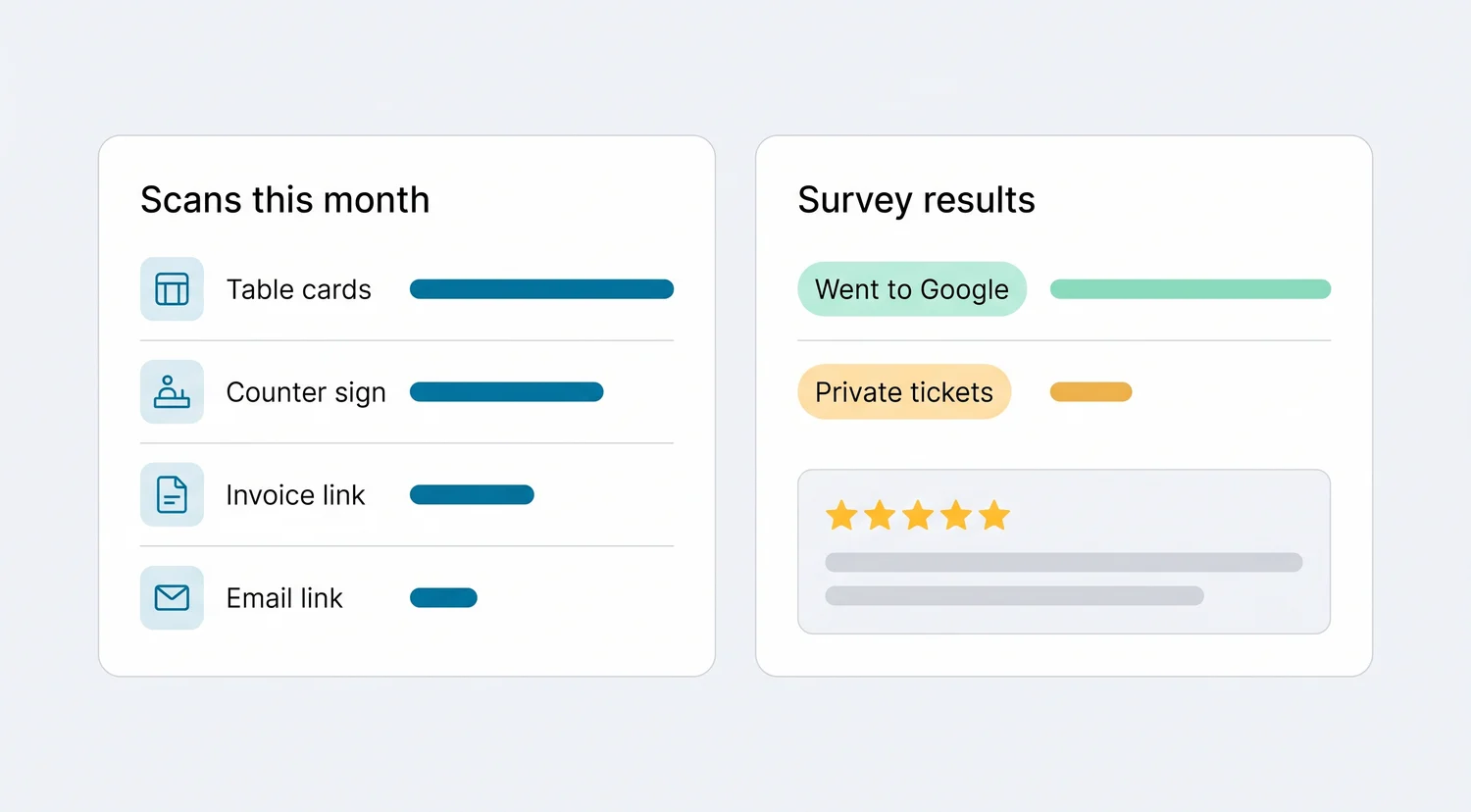
- Scans counted for every card and link, so you know which place to keep and which to move.
- Survey results: how many customers went on to Google, and how many left private feedback instead.
- Analytics: your rating trend, reply rate, the topics customers mention most and each location's numbers.
- Email alerts as soon as a 1 to 3-star review arrives.
Up to 5 locations fit in one Professional plan, each with its own Google profile and reviews. If you mainly want requests to run on their own, see review automation; for the reply side, see AI replies to Google reviews.
What it doesn't do
So you can rule it out quickly if it doesn't fit:
- No SMS or email campaigns. Scan And Review doesn't send messages for you. You share the QR code, or paste the link into emails and messages you already send.
- Google reviews only. It doesn't collect or reply to Yelp, Facebook or Tripadvisor reviews.
- No CRM or POS triggers. Nothing fires automatically when a job is closed in other software.
- No incentives and no fake reviews. There's no feature to reward customers for reviews, and there never will be.
- It can't remove reviews. You reply and report; Google decides.
Pricing
| Plan | Price | What you get |
|---|---|---|
| Professional | 49 a month, or 490 a year (two months free) | Up to 5 locations, unlimited AI replies, QR cards and surveys, Google Business Profile integration, Google Business Optimizer, analytics and email alerts for bad reviews |
| Enterprise | Custom pricing | For larger chains and groups: contact sales |
Visitors in the EU, EEA, UK and Switzerland see euros; other countries see the same amounts in US dollars. Every plan starts with a 14-day free trial, no credit card required. See pricing
Looking for ideas by industry? See how restaurants, hotels and healthcare practices ask for reviews. For a step-by-step guide without software, read how to get more Google reviews.
FAQ
What is a review generation tool?
Software that makes it easy for customers to leave a review: QR codes, review links and short surveys that lead to your Google review form, plus tracking so you can see which requests work. It never writes reviews itself.
What is review generation?
Review generation is the habit of asking every real customer for a review in a simple, consistent way, so new reviews arrive steadily instead of now and then.
Is a review generation tool allowed by Google?
Yes. Google encourages businesses to ask for reviews with a link or QR code. What it forbids is paying or rewarding customers for reviews, reviews from staff or family, review quotas for staff and pressuring customers on site.
How many reviews will I get?
That depends on how many customers you serve and how consistently the cards and links are used. No honest tool can promise a number. The scan counter shows you which places work, so you can move the ones that don't.
Does Scan And Review send review requests by text message?
No. Scan And Review doesn't send SMS or email campaigns. You share your QR code or paste the review link into messages you already send, such as booking confirmations or invoices.
What happens when a customer gives a low rating in the survey?
Their feedback reaches you privately as a ticket, and you get an email straight away. You can reply to the customer from the ticket, keep notes and mark it resolved.
Can I send customers straight to Google without the survey?
Yes. You choose for each card or link whether it opens the survey or goes straight to your Google review form.
What's the difference between a review generation service and software?
A service is usually an agency that runs text and email campaigns for you for a monthly retainer. Software like Scan And Review gives you the cards, survey and links to run it yourself, in your own voice, for a monthly subscription.
Sources: Google Business Profile Help ("Tips to get more reviews"; "About missing or delayed reviews"); Google Maps user-generated content policy ("Prohibited & restricted content": fake engagement and rating manipulation); FTC "Consumer Reviews and Testimonials Rule: Questions and Answers".