
Why reviews weigh more for repair shops
Most local businesses get judged on taste or friendliness. A repair shop is judged on trust, and a new customer has almost nothing else to go on. Look at the questions people ask Google: one of the most common is "What are the red flags of an untrustworthy automobile repair shop?" Your reviews are where they look for the answer.
That shows up in the words customers use. Reviews of repair shops tend to circle around four things:
- The bill matched the estimateThe single biggest theme. "They called before doing anything extra" is the sentence every shop wants to read.
- Someone explained the workDrivers remember an advisor who showed them the worn part or sent a photo, and they write about it.
- The car was ready when promisedA delay with a phone call is forgiven. A delay the customer had to chase is a 2-star review.
- The problem stayed fixedA comeback, the same warning light a week later, is the moment a loyal customer turns into an angry review.
Reviews also help you show up. Google says review count and score are part of how it judges a business's prominence in local results, along with relevance and distance. A shop with a steady flow of recent reviews gives Google, and drivers, a reason to pick it over the one down the road. That's why a good reputation program for an auto repair shop does three things every week: brings in new reviews, answers every review that arrives and catches problems before they spread.
Reputation management for auto repair shops starts with your Google profile
Before you ask anyone for a review, check what people see when they find your shop. A complete profile turns a reader into a phone call.
- Primary category: "Auto repair shop" for most general repair shops. Add the services you're known for as additional categories if they're a real part of the business, such as "Brake shop", "Oil change service" or "Tire shop".
- Hours that match reality, including Saturday hours and holiday closures. A driver who shows up to a locked gate leaves a review about it.
- Services and photos: the bays, the waiting area and the front counter. Customers want to see a clean, organised shop.
- A phone number someone answers. If calls go to voicemail during busy hours, say so in your reply to the review that complains about it, then fix it.
Scan And Review's Google Business Optimizer checks your profile every morning, scores it out of 100 and writes the fixes, such as a missing service description or wrong holiday hours. Nothing changes on Google until you approve it. For a quick one-off check, try the free Google Business Profile audit.
When to ask a repair customer for a review
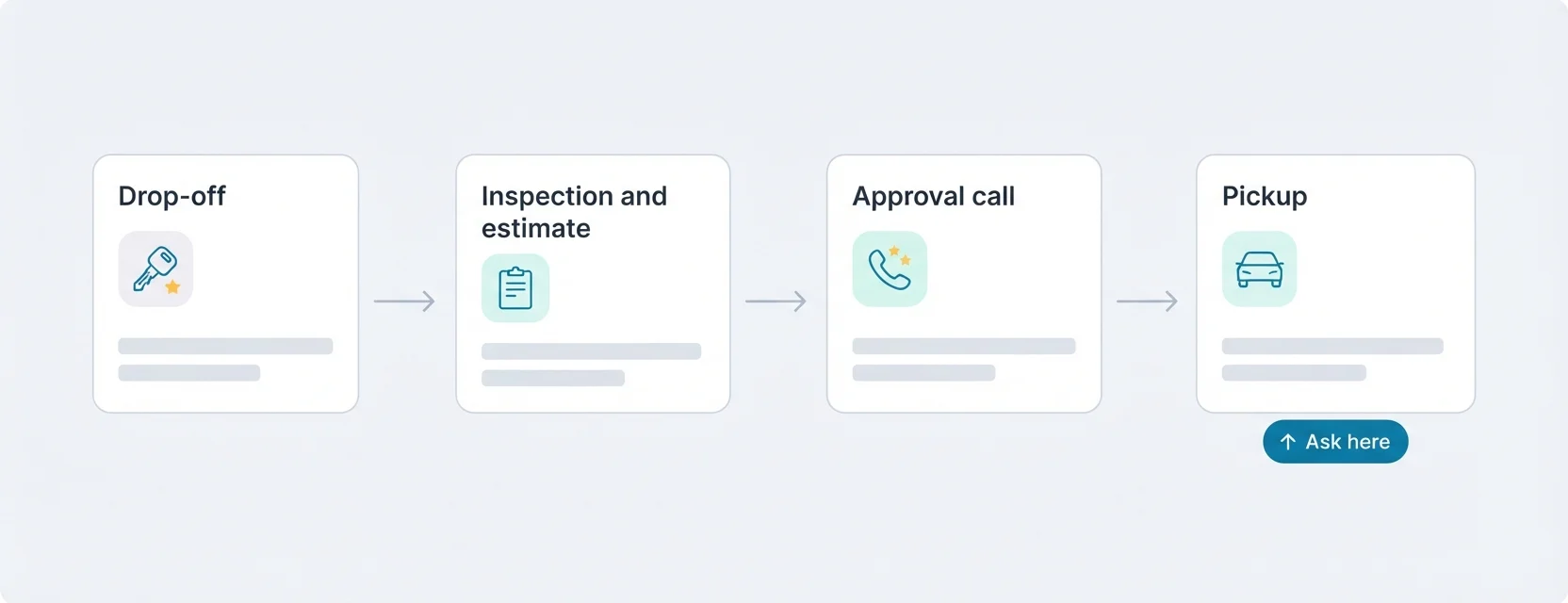
Timing matters more in a shop than almost anywhere else, because the customer's mood swings during the job. They're anxious at drop-off, worried during the estimate call and relieved at pickup. Ask when they're relieved.
| Moment | Ask? | Why |
|---|---|---|
| Drop-off | No | Nothing has happened yet, and the customer is worried about the cost. |
| Estimate or inspection call | No | They're deciding whether to approve work. A review request now feels like pressure. |
| Pickup, after the advisor explains the invoice | Yes, in person | The car runs, the bill matches what they approved, and the advisor is right there. |
| Invoice email or text from your shop software | Yes, one line and a link | A second chance for people who were in a hurry at the counter. |
| After a comeback is fixed | Only if they're clearly happy | Customers whose problem you put right often write the most convincing reviews. |
One advisor saying a single sentence at the counter works better than any sign: "If we did a good job today, a quick Google review really helps a small shop like ours. The code's on your mirror."
Where to put your QR code and review link
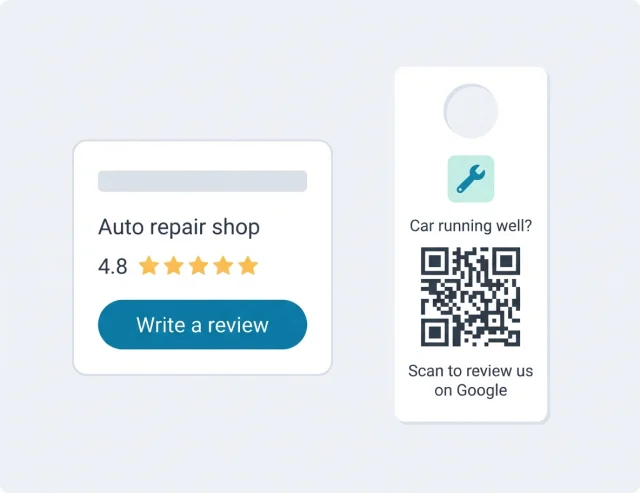
Most happy customers never review a shop because nobody asked, and finding the profile on a phone takes too long. Put a QR code where the good moment happens:
- On the mirror hangerThe paper hanger your techs already put on the rear-view mirror. Print "Car running well? Scan to review us on Google" on the back. Customers see it the moment they get in.
- On the printed invoiceA small QR code at the bottom of the invoice the advisor walks the customer through.
- At the front counterA table sign where customers pay and collect their keys, facing them, not the advisor.
- In the pickup messageIf your shop software lets you edit its "your car is ready" or invoice message, paste your review link at the end.
- On the service advisor's business cardA QR code on the back. Customers keep these cards in the glovebox for the next visit.
- In the waiting areaA sign near the coffee machine for customers who wait during an oil change or tire swap.
Each code can point straight to your Google review form or to a short survey first, and every scan is counted. After a month you'll know whether the mirror hanger or the counter sign brings in more reviews. Need a link today? Make one with the free Google review link generator, print it with the Google review card maker, or borrow wording from our review request templates.
The rules for asking
Asking every customer for an honest review is fine; Google suggests sharing a link or QR code. What gets shops into trouble is paying for reviews in any form.
Allowed
- A mirror hanger, counter sign or invoice QR code for every customer.
- One review link in the invoice email or pickup message.
- Replying to every review, good and bad.
- Reporting a review that's fake, spam or from a competitor.
Not allowed
- A free car wash, oil change or discount "for leaving a review".
- Reviews from your techs, family or friends.
- Waiving part of a bill if the customer deletes a bad review.
- Buying reviews from a service, or writing them yourself.
Google treats any discount, free service or gift in exchange for a review as an incentive and can remove those reviews. In the US, the FTC's rule on consumer reviews, in force since October 2024, also bans fake reviews and reviews bought for a particular rating.
Answering auto repair shop reviews
Answering every review is the daily part of auto repair reputation management. The person reading your reply is usually not the reviewer. It's the next driver deciding whether to trust you with their car, and they read how you handle the angry review more closely than the happy ones.
- Don't argue about the invoice in public. Even if the customer approved every line, posting the numbers reads defensive. Offer a call with the owner or service manager instead.
- Explain your process, not this customer's bill. "We call for approval before any work beyond the estimate" reassures every reader without disputing anything.
- Name the tech only if the customer did. It's lovely for the team, but leave it to the reviewer to bring them up.
- Never post repair orders, plates, VINs or phone numbers from your system in a reply.
Reply examples for repair shops
"Brought my truck in for a grinding noise. Dani showed me the worn pads on her phone before doing anything, and it cost less than the dealer quoted."
"Thanks for trusting us with your truck! Showing you the worn pads before we start is exactly how we like to work, and we'll make sure Dani sees this. See you at your next oil change."
Why it works: It repeats the detail the customer valued, which reassures nervous readers, and passes on the praise to the tech the reviewer named.
"Quoted $380 for brakes, paid almost $600. They said the rotors were needed too. Feels like a bait and switch."
"We're sorry the final bill came as a surprise. Our rule is to call for approval before any work that goes beyond the estimate, and we want to understand what happened here. Please call [owner name] directly on [phone] so we can go through the invoice with you."
Why it works: It states the shop's standard without disputing numbers in public, and moves the conversation to the owner, by name.
"Was told it'd be done by 3. Called at 4, then 5. Finally got it the next morning. Nobody called me once."
"You shouldn't have had to chase us. When a part or a job runs late, we're supposed to call you before the promised time, and we didn't. We're sorry for the wasted afternoon. If you're willing, [manager name] would like to hear what happened on [phone]."
Why it works: It admits the real failure, the missing call, rather than explaining the delay, and offers a direct contact.
"Paid to fix my check engine light. A week later it's back on. Not impressed."
"We're sorry the light came back so soon. That's frustrating after paying for the repair. Please bring the car back in or call us on [phone]; we'll look at it again and check what our repair warranty covers for you."
Why it works: It treats the comeback seriously, invites the car back and mentions the warranty without promising a free repair in public.
Scan And Review answers new Google reviews with AI auto-reply. Each reply is written in the reviewer's language and posted for you, usually about 30 minutes after the review arrives. You choose which star ratings get an automatic reply: most shops switch it on for 4 and 5-star reviews and keep 1 to 3 stars in the Urgent tab for the owner or service manager. If you'd rather approve everything, ask for a draft, edit it and post it. More on how it works: AI replies to Google reviews. For more wording ideas, see our guide to responding to Google reviews.
Catching problems before they become reviews
The best bad review is the one that never gets written because you heard about the problem first. A short survey gives unhappy customers somewhere to tell you directly.
Scan And Review's survey uses your shop's colours and wording. Customers rate the visit and tap what stood out. Private feedback reaches you as a ticket with an email alert straight away: you can reply to the customer from the ticket, keep a private note ("rotors were approved by phone at 11:40") and mark it resolved once it's sorted. That's often the difference between a comeback that gets fixed and one that ends up on Google.
What your reviews tell you about the shop
Read one review and you learn about one visit. Read fifty and you learn where your process leaks. Scan And Review's analytics groups what customers mention into topics, such as price, communication, waiting time and honesty, and shows which ones are rising.
| If reviews keep mentioning… | Look at… |
|---|---|
| "More than the quote" | Whether every extra is approved by phone, and whether advisors note the approval time |
| "Nobody called me" | A rule for a call before the promised pickup time, even when there's no news |
| "Took all day for an oil change" | Appointment slots versus walk-ins, and whether quick jobs wait behind big ones |
| "Same problem came back" | Your comeback rate per job type and how warranty work gets scheduled |
| "Dani explained everything" | What Dani does differently, so the rest of the team can copy it |
If you run more than one shop, compare the same topics side by side. A rating dip at one location usually has a cause you can find in its reviews.
Auto repair reputation management with Scan And Review
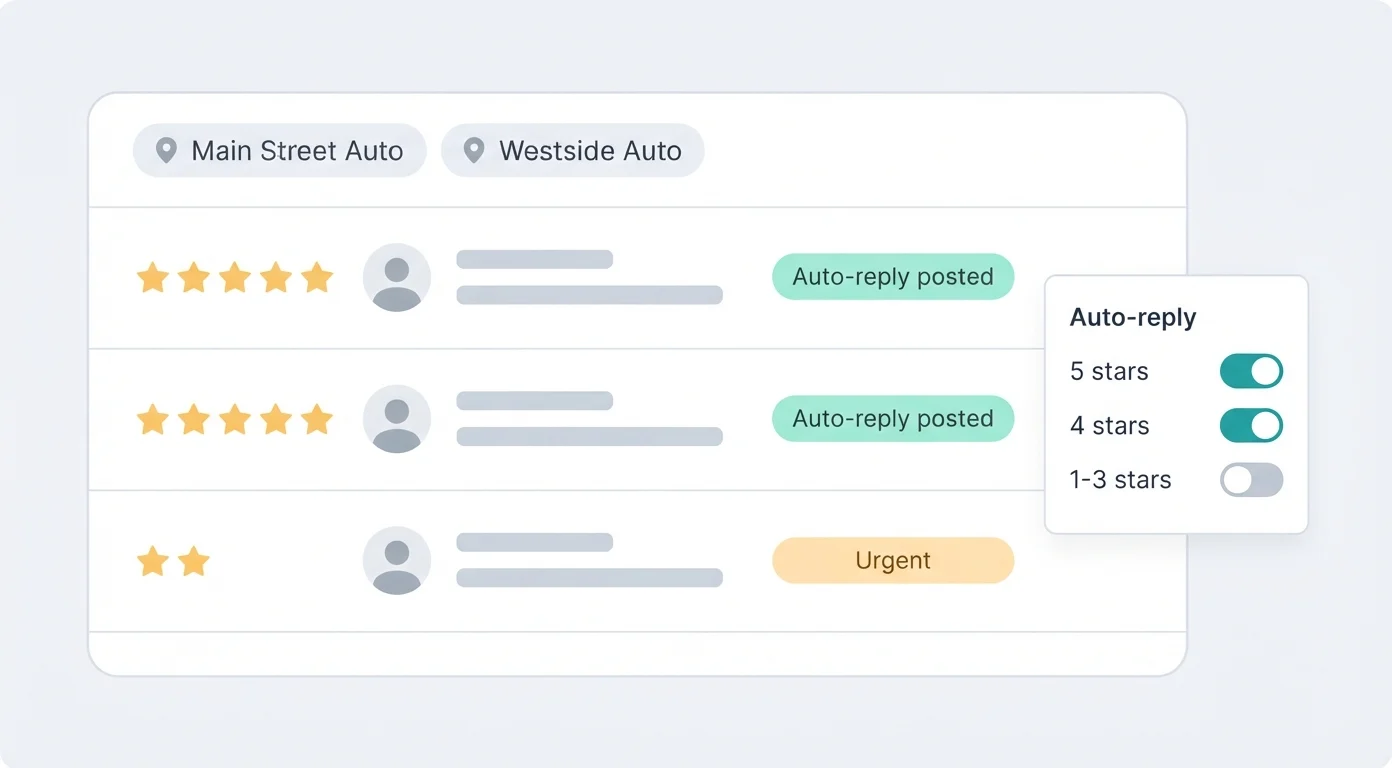
- AI auto-reply for every new Google review, in the reviewer's language, posted automatically for the star ratings you switch on.
- Bad review alerts: an email as soon as a 1 to 3-star review arrives, and an Urgent tab that keeps it on top until someone answers.
- QR cards and review links for mirror hangers, invoices and counter signs, with every scan counted.
- Surveys and private tickets so unhappy customers can reach you before they reach Google.
- Analytics and Google Business Optimizer for each location's rating trend, reply rate, topics and profile score.
What it doesn't do
So you can rule it out quickly if it doesn't fit:
- Google reviews only. It doesn't manage Yelp, Facebook, CarFax or RepairPal reviews.
- No SMS. It doesn't send texts. Use QR codes, the survey and links you paste into your own invoice emails and messages.
- No shop management integration. It doesn't connect to Tekmetric, Shopmonkey, Mitchell 1 or similar, so nothing is sent automatically when a repair order closes.
- It can't remove reviews. You reply and report; Google decides what comes down.
Software, agency or doing it yourself
There are three common ways shops handle reviews. The right one depends on how many reviews you get and who has time.
| Do it yourself | Scan And Review | Shop software add-on or marketing agency | |
|---|---|---|---|
| Cost | Your evenings | 49 a month for up to 5 locations | Usually part of a bigger monthly plan or retainer |
| Who writes replies | You, when you remember | AI auto-reply, or you approve drafts | Software drafts, or the agency's team |
| Getting reviews | Asking at the counter | Mirror hangers, invoice codes, survey, links | Texts sent automatically when the repair order closes |
| Best for | A shop with a few reviews a month | Independent shops that want every Google review answered | Shops that want review texts tied to their shop system |
If an agency promises to remove negative reviews or guarantees a number of five-star reviews, ask how. Only Google removes Google reviews, and only real customers write them. If you're a dealership with sales and service departments, our page on car dealer reputation management covers how to split reviews between department profiles.
Pricing
| Plan | Price | What you get |
|---|---|---|
| Professional | 49 a month, or 490 a year (two months free) | Up to 5 locations, unlimited AI replies, QR cards and surveys, Google Business Profile integration, Google Business Optimizer, analytics and email alerts for bad reviews |
| Enterprise | Custom pricing | For multi-shop groups with more locations: contact us |
Visitors in the EU, EEA, UK and Switzerland see euros; other countries see the same amounts in US dollars. Every plan starts with a 14-day free trial, no credit card required. See pricing
Want to know how many 5-star reviews it takes to move your rating from 4.3 to 4.6? Try the free Google review calculator.
FAQ
What is auto repair reputation management?
It's how a repair shop earns, answers and learns from the reviews drivers leave, mostly on Google. It covers asking happy customers for reviews at the right moment, replying to every review and fixing the problems that keep coming up.
When should a mechanic ask for a review?
At pickup, once the advisor has explained the invoice and the car is running well, plus one link in the invoice email or pickup message. Asking at drop-off or during the estimate call feels like pressure.
Can we offer a free car wash or discount for a review?
No. Google treats any discount, free service or gift in exchange for a review as an incentive and can remove those reviews. Ask every customer for an honest review with nothing attached.
How should a shop reply to a review that says it overcharged?
Stay calm, don't post invoice figures, state your standard, for example that you call for approval before any work beyond the estimate, and invite the customer to call the owner or service manager by name.
Does Scan And Review reply to reviews automatically?
Yes. AI auto-reply posts a reply to each new Google review for the star ratings you choose, usually about 30 minutes after it arrives. Many shops auto-reply to 4 and 5 stars and keep 1 to 3 stars for the owner.
Does it work with my shop management software?
No. There's no integration with Tekmetric, Shopmonkey, Mitchell 1 or other shop systems, and no SMS. If your shop software lets you edit its messages, paste your review link there, and use QR codes at the counter and on mirror hangers.
Can I manage more than one shop?
Yes. Professional covers up to 5 locations, with every shop's reviews in one list and each location's numbers side by side. Larger groups can contact us about Enterprise.
Sources: Google Business Profile Help ("Tips to get more reviews"; "Tips to improve your local ranking on Google"); Google Maps user-contributed content policy; FTC "Consumer Reviews and Testimonials Rule".