
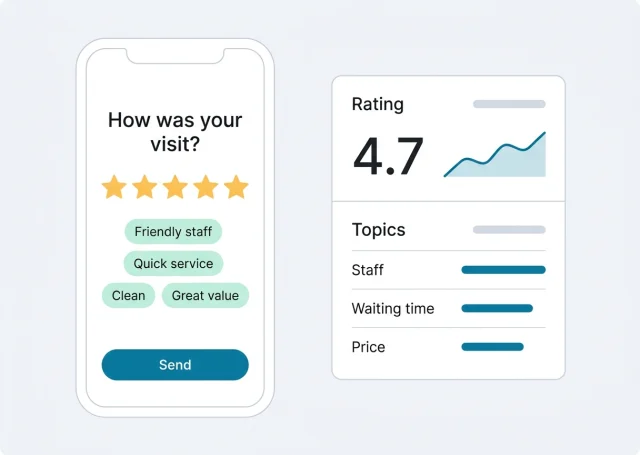
What customer satisfaction software does
Most customer satisfaction software was built for call centres and online businesses, where every customer arrives through an email or a chat window. A local business is different: your customers walk in, pay and walk out. Satisfaction software for you has to work in that moment.
- Asks at the right momentA QR code on the table, the counter or the bill opens a short survey on the customer's phone. No email address needed.
- Catches problems privatelyWhen a customer reports a problem, it arrives as a ticket with an email alert, so you can reply and fix it before the customer goes public.
- Watches your public ratingYour Google reviews are the satisfaction score every new customer sees. Each one is answered, and low ratings are flagged.
- Shows you the patternTopics, sentiment and rating trend over time, so you know whether a change you made actually helped.
The point of all four is the same: hear about dissatisfaction from the customer, not from a stranger reading your reviews.
Which customer satisfaction tool fits your business?
The customer satisfaction tool lists you'll find online mix very different products. It helps to sort them by where your customers meet you:
| Kind of tool | Typical examples | Built for | Fits a local business? |
|---|---|---|---|
| Help-desk CSAT add-ons | CSAT inside Zendesk, Freshdesk, Help Scout; Simplesat | Rating each support ticket or chat | Only if your customers mainly contact you by email or chat |
| General survey software | SurveyMonkey, Typeform, SmartSurvey, Alchemer | Any survey, any audience | Yes for occasional surveys; you build the rest yourself |
| Enterprise experience platforms | Qualtrics, Medallia, InMoment | Large brands with research teams | Rarely; priced and staffed for big companies |
| Local satisfaction and review software | Scan And Review | Customers who visit in person and read your Google reviews | Built for it |
If your business runs on support tickets, a help-desk CSAT tool is the right buy. If you visit customers, serve them at a counter or see them in a chair, you need something that works on a phone in the moment, and that ties satisfaction to your Google reviews.
CSAT, NPS and star ratings: what to measure
People searching for CSAT software usually want a score. There are three common ones, and they answer different questions:
| Measure | The question | How it's calculated | Best for |
|---|---|---|---|
| CSAT | "How satisfied were you with your visit?" on a 1 to 5 scale | Share of 4 and 5 answers out of all answers, as a percentage | How a single visit or service went |
| NPS | "How likely are you to recommend us?" on a 0 to 10 scale | % of 9-10 answers minus % of 0-6 answers | Loyalty over time |
| Star rating | The stars customers give in a survey or on Google | Average of all ratings | What the public sees, and what drives new customers |
An example: 120 customers answer your CSAT question, and 102 of them pick 4 or 5. Your CSAT is 102 ÷ 120 = 85%. You can run your own numbers with the free CSAT calculator and NPS calculator.
For most local businesses, the most useful pair is a visit rating in your own survey (private, immediate, with comments) and your Google rating (public, slower to move, read by everyone). The survey tells you what to fix this week. The Google rating tells you whether customers noticed.
How Scan And Review measures customer satisfaction
Here's what happens from the customer's first scan to the moment you see the result:
The customer scans
A QR code on a table card, counter sign, bill or invoice, or a link in your email.
They rate the visit
A short survey in your colours and wording. They pick stars and tap a few highlights.
The feedback reaches you
The AI can turn their highlights into a review to post on Google. A reported problem arrives as a private ticket.
You see the pattern
Ratings, topics and sentiment build up per location over 30 days, 90 days or a year.
The AI turns what customers tapped into a short review they can post on Google. If a customer reports a problem, it reaches you in a ticket only your team sees, with an email alert.
A survey customers actually finish
Customer satisfaction survey software often fails at the simplest part: people give up halfway. In a shop or a restaurant, you get about thirty seconds of attention. Keep the survey to what you'll act on:
Keeps people answering
- One rating question: "How was your visit today?"
- A handful of tap-to-choose highlights: "Friendly staff", "Quick service", "Clean rooms".
- One optional comment box.
- Your logo, colours and wording, so it's clearly from you.
Loses them
- Ten rating scales for every part of the visit.
- Required fields for name, email and phone.
- Questions about things the customer didn't see.
- A generic form that doesn't say which business it's from.
Scan And Review's survey builder shows a live phone preview while you edit, so you see exactly what the customer sees before you print the QR code.
Turning unhappy customers around: tickets, not spreadsheets
A satisfaction score on its own changes nothing. What matters is what happens to the customer who scored you a 2. In a lot of customer satisfaction platforms, that answer ends up in a report someone reads at the end of the month. By then the customer has left a review.
In Scan And Review, a problem reported in the survey becomes a ticket the moment it's sent:
- An email right awayYou hear about it while the customer may still be in the building, or the same evening at the latest.
- Reply from the ticketWrite back to the customer directly, starting from an AI draft if you like, and add the details of what you can offer.
- Private notesKeep internal notes separate from the reply, for example "checked with the kitchen: side dish missed on the order".
- Mark it resolvedClose the ticket when it's sorted, so the team can focus on the concerns that still need attention.
That's the loop customer feedback systems are supposed to close: hear it, answer it, fix it, record it. For a deeper look at complaint handling, see our page on customer complaint software.
Your Google rating is a satisfaction score too
Every Google review is an unprompted satisfaction survey that everyone can read. That makes it the measure your future customers care about most, and it's why satisfaction software for a local business should include it.
Scan And Review connects to your Google Business Profile and brings every review into one list:
- AI auto-reply answers each new review in the reviewer's language, posted automatically for the star ratings you choose, usually about 30 minutes after it arrives. Many businesses auto-reply to 4 and 5 stars and keep 1 to 3 stars for themselves.
- Email alerts reach you as soon as a 1 to 3-star review arrives, and the Urgent tab keeps low ratings at the top until someone answers.
- Analytics shows review count, rating trend and reply rate, so a dip is visible early. More on replies: AI replies to Google reviews.
What customers are telling you: topics and sentiment
A rating says how satisfied customers are. Their words say why. Scan And Review's analytics groups what customers write into recurring topics and marks what they praise or criticise. Read it like this:
| You see… | It often means… | Try… |
|---|---|---|
| "Waiting time" rising at one location | A staffing or routine problem at peak hours | Compare that location's reviews at lunch and dinner before changing anything |
| "Friendly staff" mentioned again and again | A real strength | Put it in your Google description and on your website |
| "Price" turning negative | Customers feel surprised, not necessarily that you're too expensive | Check how prices and extras are explained before the bill |
| "Cleanliness" appearing for the first time | Something slipped recently | Ask the team what changed in the last few weeks |
After you make a change, look at the same topic again with the next period's reviews. That's how customer satisfaction measurement becomes improvement, not just a number.
Choosing customer satisfaction software: a checklist
Before you pick a customer satisfaction app or platform, check these against how your business actually works:
- Where do customers answer? On their phone at your counter, by email afterwards, or in a chat window? Pick a tool that works there.
- Who reads the answers, and how fast? If nobody sees a complaint for a week, the tool isn't helping. Look for instant alerts.
- Can you reply to the customer from the tool, or only see a score?
- Does it connect to your public reviews? For a local business, a survey that ignores Google misses the score that brings in new customers.
- What does it cost for your number of locations, and is the price published?
- How long does setup take? If it needs a consultant, it's built for a bigger company.
What it doesn't do
- Not a research survey tool. No branching logic, panels or exports for statistical analysis; use a general survey tool for one-off research.
- No help-desk ticketing for email and chat support. Tickets come from your survey.
- No SMS or automatic email sending. Customers reach the survey through QR codes and the links you add to your own messages.
- Google reviews only on the public side; no Yelp, Tripadvisor or Facebook.
Everything in the plan
- Branded surveysYour colours, logo and wording, with a live preview. Customers rate their visit and tap highlights.
- QR cards and linksTable cards, business cards and A4 signs, plus links for your emails. Every scan is counted.
- Private feedback ticketsReply, keep notes and mark resolved, with an email alert for every new one.
- AI auto-replyEvery new Google review answered in the reviewer's language, automatically for the ratings you choose.
- AnalyticsRating trend, reply rate, topics and sentiment for each location.
- Google Business OptimizerYour Business Profile checked every morning and scored out of 100, with fixes you approve before they go live.
Pricing
| Plan | Price | What you get |
|---|---|---|
| Professional | 49 a month, or 490 a year (two months free) | Up to 5 locations, unlimited AI replies, QR cards and surveys, Google Business Profile integration, Google Business Optimizer, analytics and email alerts for bad reviews |
| Enterprise | Custom pricing | For businesses with more locations: contact us |
Visitors in the EU, EEA, UK and Switzerland see euros; other countries see the same amounts in US dollars. Every plan starts with a 14-day free trial, no credit card required. See pricing
FAQ
What is customer satisfaction software?
Software that asks customers how satisfied they are, collects the answers and helps you act on them. For local businesses that usually means short surveys at the point of service, alerts for unhappy customers and a view of public reviews.
What is CSAT software?
CSAT software measures the customer satisfaction score: the share of customers who rate their experience 4 or 5 on a 1 to 5 scale. Help-desk tools ask it after each support ticket; local businesses ask it after a visit, often through a QR code.
How do you calculate a CSAT score?
Divide the number of 4 and 5 answers by the total number of answers and multiply by 100. For example, 102 satisfied answers out of 120 is a CSAT of 85%.
What's the difference between CSAT and NPS?
CSAT asks how satisfied someone was with a specific visit or service. NPS asks how likely they are to recommend you, on a 0 to 10 scale, and subtracts the share of detractors (0-6) from promoters (9-10). CSAT is better for a single visit, NPS for loyalty over time.
What tool is used to measure customer satisfaction in a local business?
A short survey customers can open from a QR code at the counter, plus your Google rating. Scan And Review combines both: a branded survey with private tickets for problems, and every Google review answered with AI.
Can unhappy customers reach us privately?
Yes. A problem reported in the survey arrives as a private ticket with an email alert. You can reply to the customer from the ticket, add internal notes and mark it resolved.
Does it replace SurveyMonkey or Typeform?
For quick visit surveys, yes. For research surveys with branching logic, panels and detailed exports, keep a general survey tool; Scan And Review focuses on satisfaction at the point of service and on your Google reviews.