
Where complaints come from in a local business
Big companies have a complaints address. A local business has a counter, a phone and a Google profile. Complaints arrive through all of them:
| Where | What happens today | The risk |
|---|---|---|
| At the counter, in person | Someone on the team hears it and deals with it, or doesn't | It's never written down, so the same problem comes back |
| On the phone | Whoever picks up promises to pass it on | It gets lost between shifts |
| In a Google review | Someone notices it days later | Every future customer reads it before you've answered |
| In a survey or feedback form | It lands in an inbox nobody checks | The customer waited for an answer and gave up |
| Never said at all | The customer just doesn't come back | You lose them and never learn why |
The last row is the biggest. Many unhappy customers never complain; they just don’t come back. Customer complaint software for a local business has to make complaining easy enough that people actually do it, and then make sure every complaint reaches someone who can act.
What complaint management software should do
Whatever the size of the business, complaint management software has the same five jobs:
Capture
Give customers an easy way to tell you, and record every complaint in one place.
Alert
Tell the right person straight away, not at the end of the week.
Respond
Answer the customer quickly and personally, in private or in public.
Resolve and learn
Fix the problem, record what you did and spot complaints that keep coming back.
In Scan And Review, two kinds of complaint go through those steps: private complaints from your survey, and public complaints in your Google reviews.
Private complaints: survey tickets
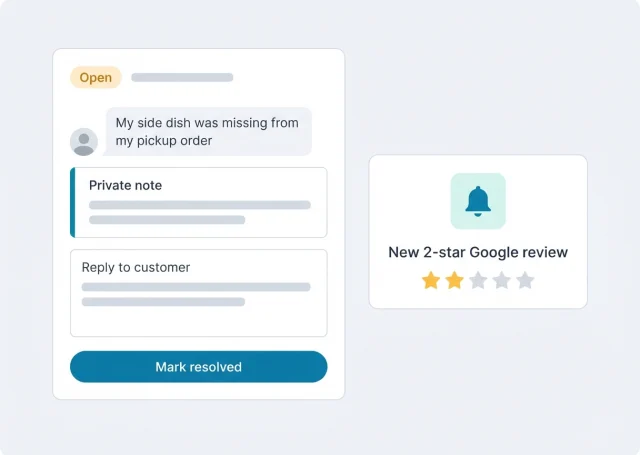
Put a QR code where customers already are, such as the table, the counter, the bill, the invoice or a confirmation email. It opens a short survey in your colours and wording. When a customer reports a problem there, it becomes a ticket:
- An email right awayYou hear about the complaint the moment it's sent, often while the customer is still nearby or the same evening.
- Everything in one ticketWhat the customer wrote, when and at which location, kept together instead of scattered across inboxes and notes.
- Reply to the customerAnswer from the ticket. Start from an AI draft if you like, then add what you can actually offer.
- Private notesInternal notes stay separate from the reply, for example what the kitchen said or which staff member was on shift.
- Mark it resolvedClose the ticket once it's sorted, so the open list only shows complaints that still need attention.
Here's a typical one. A customer picks up a takeaway order and finds a side dish missing. At home, they scan the code on the bag and report it. You get an email, open the ticket, check with the kitchen ("missed on the order at 7:40, busy Friday"), add that as a private note, reply with an apology and an offer, and mark it resolved. The customer feels heard, and you have a record that Friday pickups need a second check.
Public complaints: bad Google reviews
Some customers go straight to Google. Those complaints are the most urgent, because everyone can read them. Scan And Review connects to your Google Business Profile and treats a low review as a complaint that needs an owner:
- An email alert as soon as a 1 to 3-star review arrives.
- The Urgent tab keeps unanswered low ratings at the top until someone replies.
- AI drafts for the reply: ask for one, edit it and post it. Many businesses let AI auto-reply post the answers to 4 and 5-star reviews on its own and keep 1 to 3 stars for a person.
Customer complaint management in public has its own rules. The reply isn't really for the reviewer. It's for the next customer reading it.
Replying to complaints in Google reviews
"Waited 50 minutes past my appointment time. Nobody said a word until I asked."
"We're sorry. Waiting that long without anyone telling you why isn't acceptable, and we're changing how the front desk handles delays. If you'd like to talk it through, please call [manager name] on [phone]."
Why it works: It admits the real failure, the missing explanation, says what's changing and offers a named person, without excuses.
"Ordered the vegetarian option, got chicken. Had to go back and they acted like it was my fault."
"Thank you for telling us, and we're sorry. Getting the order wrong was our mistake, and you should never be made to feel otherwise. We've shared this with the team. Please ask for [manager name] on your next visit; we'd like to make it right."
Why it works: It takes responsibility for both problems, the order and the attitude, and invites the customer back to a named manager.
"Was told one price on the phone and charged more at the end. Felt dishonest."
"We're sorry the final price came as a surprise. We aim to confirm any change in price before we go ahead, and we want to understand what happened. Please call us on [phone] so we can go through it with you."
Why it works: It doesn't argue figures in public, states the standard and moves the conversation to a private call.
"Food was great, but the music was so loud we couldn't talk."
"Thank you, we're glad you enjoyed the food! You're not the first to mention the music on busy evenings, so we're turning it down after 8pm. We hope you'll give us another try."
Why it works: It thanks them for the praise, treats the complaint as useful and says what changes, which shows other readers you listen.
What all four have in common: a short apology without "but", one sentence about what changes, a named person or a phone number, and no personal details or arguments. For more examples, see our guide to responding to Google reviews.
Complaint handling software: how fast should you answer?
Speed matters more than perfect wording. A good reply a few hours later beats a perfect one a week later. Sensible targets for a small business:
| Complaint | Target | Why |
|---|---|---|
| Survey ticket | Same day, ideally within a few hours | The customer chose to tell you privately; a fast answer rewards that |
| 1 or 2-star Google review | Within one working day | It's public, and the first reply is what readers judge |
| 3-star Google review | Within two working days | Usually a mixed visit; a thank-you and a fix are enough |
| In-person complaint | Before the customer leaves | Then write it down, so it isn't lost |
Write down who owns each kind. In many small businesses the owner answers Google reviews and the shift manager answers survey tickets. Whatever you choose, one name per channel stops complaints from falling between two people.
Complaint tracking software: what to record
The point of complaint tracking software is to remember. A complaint you fixed once but didn't record will come back. Record the same few things for every complaint:
- When and whereDate, time and location. Patterns by day and shift often explain more than the complaint itself.
- What it was aboutWaiting time, a wrong order, price, cleanliness, staff. Use the same handful of words every time.
- Who handled itThe person who replied, so the customer gets a consistent answer if they come back.
- What you didThe apology, the offer, the fix in the routine. "Resolved" should mean something specific.
Scan And Review keeps the ticket, its notes and the reply together, and its analytics groups what customers write in Google reviews into topics, showing which ones are rising per location. If "waiting time" keeps climbing at one location, that's a staffing or routine problem, not bad luck.
A complaint management system or a help desk?
The software you'll find for "complaint management system" falls into three groups. They solve different problems:
Help desks
Built for: Support teams answering email, chat and phone
Where complaints come from
Yes: Email, chat, phone, web forms
Google reviews
No: Not usually
Setup and cost
Partly: Per agent per month, setup by the support team
Typical examples
Partly: Zendesk, Freshdesk, Zoho Desk
Regulated complaint systems
Built for: Industries that must log and report complaints
Where complaints come from
Yes: Forms and records with audit trails
Google reviews
No: No
Setup and cost
No: Quoted, with implementation projects
Typical examples
Partly: Quality and compliance suites
Scan And Review
Built for: Local businesses whose customers visit in person
Where complaints come from
Partly: Your QR survey and your Google reviews
Google reviews
Yes: Alerts, Urgent tab, AI replies
Setup and cost
Yes: 49 a month for up to 5 locations; an afternoon to set up
Typical examples
Yes: Scan And Review
Choose a help desk if most complaints arrive by email or chat and you have a support team. Choose a regulated system if your industry, such as medical devices or financial services, requires a formal complaints register with audit trails. Choose Scan And Review if your customers meet you in person and your Google rating matters to how new customers find you.
What it doesn't do
Be clear about the limits before you choose:
- No email, chat or phone inbox. Complaints come in through your survey and your Google reviews, not through a shared support mailbox.
- No formal complaints register for regulated industries, and no audit-trail reporting.
- No SMS or automatic email. Customers reach the survey through QR codes and links you add to your own messages.
- Google reviews only on the public side. It doesn't monitor or answer Yelp, Tripadvisor or Facebook.
- It can't remove a review. You reply and, if a review breaks Google's policies, report it; Google decides.
Everything in the plan
- Branded surveysYour colours, logo and wording, opened from a QR code or link. Customers can report a problem in a few taps.
- Private feedback ticketsEmail alerts, replies from the ticket, internal notes and a resolved status.
- Bad review alertsAn email for every 1 to 3-star Google review, and an Urgent tab until it's answered.
- AI repliesDrafts for complaints, and auto-reply for the star ratings you choose, in the reviewer's language.
- AnalyticsTopics, sentiment, rating trend and reply rate per location.
- Google Business OptimizerYour Business Profile checked every morning and scored out of 100, with fixes you approve.
Measuring satisfaction more broadly, not just complaints? See our page on customer satisfaction software.
Pricing
| Plan | Price | What you get |
|---|---|---|
| Professional | 49 a month, or 490 a year (two months free) | Up to 5 locations, unlimited AI replies, QR cards and surveys, Google Business Profile integration, Google Business Optimizer, analytics and email alerts for bad reviews |
| Enterprise | Custom pricing | For businesses with more locations: contact us |
Visitors in the EU, EEA, UK and Switzerland see euros; other countries see the same amounts in US dollars. Every plan starts with a 14-day free trial, no credit card required. See pricing
FAQ
What is customer complaint software?
Software that captures complaints, alerts the right person, helps you answer the customer and keeps a record of what was done. For a local business it should cover both private complaints and public ones in Google reviews.
What is complaint management?
The process of receiving a complaint, responding to the customer, fixing the cause and recording it, so the same problem doesn't come back. Software makes sure none of those steps is skipped.
How do customers send a complaint through Scan And Review?
They scan a QR code on a card, sign, bill or invoice, or tap a link in your email, and fill in a short survey. A reported problem arrives as a private ticket with an email alert.
Can I reply to the customer from the ticket?
Yes. Write your reply in the ticket, starting from an AI draft if you like. Internal notes stay separate from the reply, and you can mark the ticket resolved.
How should I respond to a complaint in a Google review?
Reply within a day, apologise without excuses, say what you're changing and give a name or phone number to continue privately. Don't argue figures or share personal details in public.
Is it a help desk?
No. It doesn't have a shared email, chat or phone inbox. It's built for complaints from your own survey and from Google reviews, which is where most local customers complain.
Does it work for regulated complaint handling?
No. It doesn't provide a formal complaints register or audit-trail reporting. Industries with legal complaint-handling rules should use a system built for that.
Sources: Google Business Profile Help ("Read and reply to reviews"); Google Maps user-contributed content policy.