How to Respond to Google Reviews: 25+ Templates & Examples (2026)
Learn how to respond to Google reviews the right way. Get 25+ ready-to-use templates for positive, negative, neutral, and fake reviews — or auto-reply to every Google review with AI.


You just got a one-star Google review. Your stomach drops.
You know you need to reply — but every word sounds wrong. Too stiff. Too desperate. Too defensive. So you close the tab. I'll deal with it later.
But later never comes. And that unanswered review sits there — while future customers read it and quietly decide you don't care.
Here's the truth most business owners miss: what you say back matters more than the bad review itself. A thoughtful Google review reply can win you more customers than a dozen five-star ratings ever will.
This guide shows you exactly how to respond to Google reviews — the right way, with 25+ ready-to-use templates for positive, negative, neutral, and fake feedback. Plus, you'll learn how to auto-reply to every Google review with AI so you never fall behind again.
TL;DR: Reply to every Google review within 24 hours. Use the customer's name, mention something specific, and stay warm — even when they're angry. For 4–5 star reviews, let AI auto-reply for you.
Why Responding to Google Reviews Matters
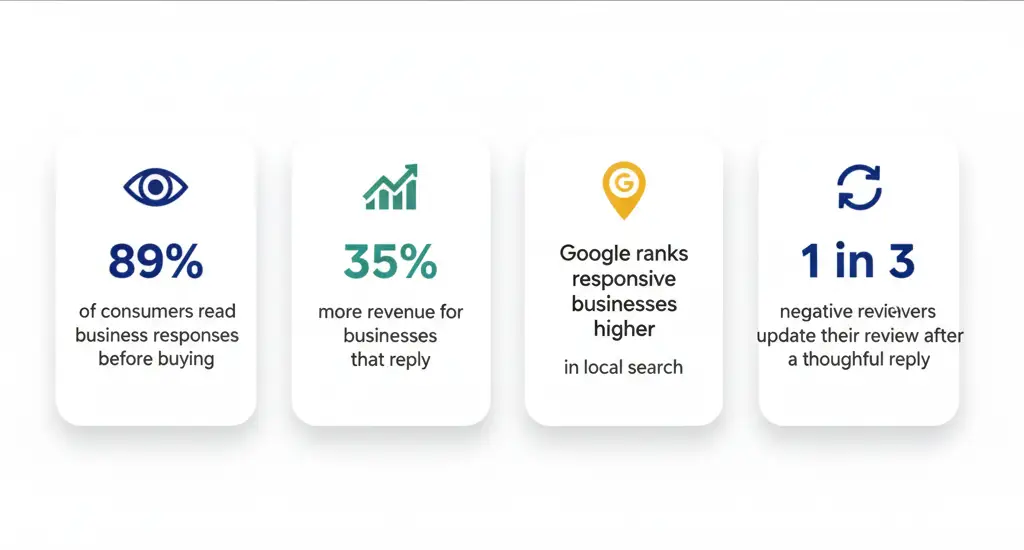
Still wondering whether you really need to respond to every Google review? The data is overwhelming:
- 89% of consumers read business responses before deciding to buy
- Businesses that respond to Google reviews see 35% more revenue on average
- Google rewards active businesses with higher local search rankings (Google's own guidance)
- 1 in 3 unhappy reviewers will update their review after a thoughtful reply
- Replying within 24 hours doubles the chance of converting a critic into a fan
Every Google review you ignore is a customer you're walking away from. And as your reviews grow, the time it takes to write a thoughtful Google review reply for each one grows with them — which is why smart business owners now automate their Google review responses.
How to Reply to a Review on Google (Step-by-Step)
Wondering exactly how to reply to Google reviews? You have two paths: do it manually, or let AI do it for you.
Option 1: How to Reply to Google Reviews Manually
You can respond to a Google review from any of these three places:
On Desktop (Google Business Profile)
- Go to business.google.com
- Click Reviews in the left menu
- Find the review and click Reply
- Type your response and hit Post
On Mobile (Google Maps App)
- Open the Google Maps app
- Tap your profile picture → Your Business Profile
- Tap Reviews → Reply
Through Google Search
- Search your business name on Google
- Scroll to Google reviews in your knowledge panel
- Tap Reply under any review
⚠️ Manual replies require a verified Google Business Profile. If you haven't claimed yours yet, that's step zero.
Option 2: The Smarter Way — Auto-Reply to Google Reviews
Manually replying works when you have 2 reviews a month. But what about when you have 20? Or 200?
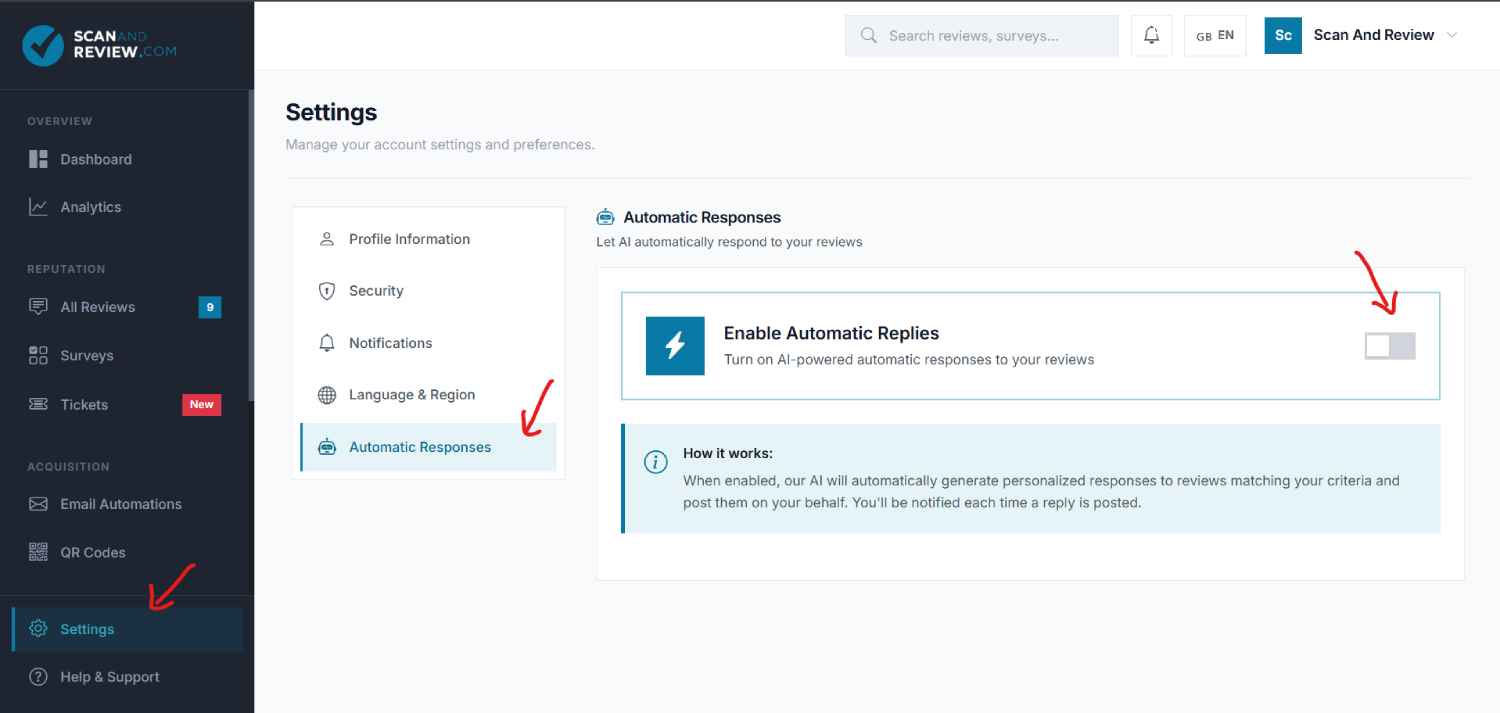
With Scan and Review, you skip the entire process. Connect your Google Business Profile once, turn on Automatic Responses, and AI writes a unique, personalized Google review reply and posts it directly to Google — no logins, no copy-paste, no missed reviews.
How to Respond to Positive Google Reviews (+ 8 Templates)
Don't waste five-star reviews with a lazy "Thanks!" Every positive Google review reply is a free advertisement that future customers will read.
What every great positive Google review response includes
- Their name — instantly more personal
- A specific detail they mentioned — proves you actually read it
- An invitation to return — turns one visit into many
- A warm, human tone — no corporate jargon
8 Google Review Response Templates for Positive Feedback
1. The All-Purpose Reply
Hi [Name], thank you so much! We're thrilled you enjoyed [specific detail]. It means the world to our team. Can't wait to see you again — next time, you have to try the [product/service]!
2. When They Mention Your Team
Thank you, [Name]! I'll pass your kind words to [staff member] — they'll be over the moon. Customers like you are exactly why we do what we do.
3. Quick & Warm (For High Volume)
Thanks [Name]! So glad you had a great time. We really appreciate you sharing — see you soon!
4. When They're a Repeat Customer
[Name], your continued support means everything to us. Thank you for being part of our [business name] family — see you next time!
5. When They Recommend You
Hi [Name], thank you for recommending us! That's the highest compliment any business can get. Welcome any of your friends — we'll take great care of them.
6. Detailed Praise Reply
Wow, [Name] — this just made our day. Thank you for the thoughtful review. We work hard to get [specific thing] right, and it's wonderful to hear it shows. See you again soon!
7. Short & Sweet
[Name] — thank you! So happy we could deliver. See you next time!
8. Highlighting What They Loved
Hi [Name], we're so glad [specific thing] hit the spot! That's exactly what we aim for. Thanks for taking the time to share — looking forward to your next visit.
💡 Getting 20+ positive reviews a month? Customizing these templates by hand gets old fast. Scan and Review reads each review and writes a unique, personal Google review response — then posts it directly to Google. Set the star range to 4–5 stars and let AI handle every thank-you. Try it free for 12 months →
How to Respond to a Negative Google Review (+ 7 Templates)
This is what you really came here for — and here's what most people miss:
A great reply to a bad review is one of the most powerful things you can post online. When future customers see a calm, caring response to a one-star review, they think: "This business actually cares." That builds more trust than a wall of five-star reviews ever could.
Knowing how to respond to a negative Google review isn't about "winning" the argument. It's about showing every future reader that you listen, you care, and you take action.

How to Respond to Bad Reviews on Google: The 4-Step Formula
Every great negative review response follows the same four steps:
- Acknowledge the specific problem
- Apologize sincerely (without being defensive)
- Offer a concrete fix or next step
- Take it offline with your direct email or phone number
Avoid at all costs:
- Arguing or correcting the customer publicly
- Blaming staff, suppliers, or "the system"
- Sarcasm, even mild
- Saying "sorry you feel that way" (it's a non-apology)
7 Negative Google Review Response Examples
1. The Professional Response (Use When Unsure)
Hi [Name], thank you for the honest feedback. I'm truly sorry we didn't meet the mark. I'd love the chance to make this right — could you reach out to me at [email/phone]? I want to understand what happened and fix it.
2. Specific Service Issue
[Name], you're absolutely right — [specific issue, e.g., "a 45-minute wait is not okay"]. We hold ourselves to a higher standard, and we missed it here. I've already spoken with our team. Please reach out to [email/phone] — I'd love to make it up to you personally.
3. The Angry Reviewer
[Name], I completely understand the frustration — you deserved better, and I'm truly sorry. I want to make this right personally. Could you reach out at [email/phone]? I'll be the one answering.
4. When the Customer Is Partly Wrong
Hi [Name], thank you for taking the time to share this. I want to make sure I understand exactly what happened so we can do better. Could you email me at [email]? I'd really like to hear the full story directly from you.
5. Product Quality Complaint
[Name], I'm so sorry the [product] didn't live up to expectations. That's not the standard we want anyone walking away with. Please email me at [email] and we'll make it right — full refund, replacement, whatever works for you.
6. Long Wait or Delay
Hi [Name], waiting that long is genuinely frustrating, and we owe you better. We've adjusted our staffing for [day/time] starting this week. I'd love to make it up to you — please reach out at [email/phone].
7. Staff Behavior Complaint
[Name], I'm really sorry you had this experience with our team. That's not who we are or who we want to be. I've already started looking into it on our end. Please email me directly at [email] — I want to hear what happened from you.
What NOT to Say When Responding to a Negative Review on Google
| Bad Response | Why It Hurts You |
|---|---|
| "That's not true." | Calls the customer a liar in public |
| "Sorry you feel that way." | A dismissal disguised as an apology |
| "We have thousands of happy customers." | Tells this person they don't matter |
| "This review is fake." | Report it privately — never say this publicly |
| "You should have told us at the time." | Shifts blame onto the customer |
| "Our policy clearly states…" | Makes you sound robotic and rigid |
💡 Negative reviews always need a human touch. That's why Scan and Review lets you set a minimum star rating for Auto-Reply — most businesses auto-reply to 4–5 star reviews and write personal responses for the tough ones. You stay in control of the moments that matter.
How to Reply to Neutral & Fake Google Reviews
How to Respond to 3-Star Reviews
Three-star reviewers are sitting on the fence. A great Google review reply can pull them back to your side:
Hi [Name], so glad you enjoyed [positive aspect]! I'd love to know what would've made it five stars — feel free to email me at [email]. Hope to see you again soon!
Alternative:
Thanks for the honest review, [Name]. We're always trying to get better — if there's something specific we could improve, I'd love to hear it. You can reach me directly at [email].
How to Deal With Fake or Spam Google Reviews
If you suspect a review is fake or spam, never call it out publicly. That always backfires. Reply professionally first:
We take every review seriously, but we're unable to find a record of your visit in our system. Could you email us at [email] with more details? We'd really like to look into this.
Then report the review through Google:
- Find the review in your Google Business Profile
- Click the three dots → Report review
- Choose the violation (spam, conflict of interest, off-topic, etc.)
Google typically reviews reports within 3–5 business days. For details on what counts as a policy violation, see Google's prohibited and restricted content policy.
Google Review Response Examples by Industry

| Industry | Positive Reply Example | Negative Reply Example |
|---|---|---|
| Restaurant | "Maria, so glad you loved the truffle pasta! Save room for tiramisu next time!" | "Hi David, sorry about the wait. I've already adjusted our weekend schedule. Email me at [email] — let me make it up to you." |
| Medical / Dental | "Thank you, Sarah! We're so glad Dr. [Name] could help. See you at your next checkup!" | "Hi James, I'm sorry about the scheduling mix-up. We've changed our process so it doesn't happen again. Please call [phone] directly." |
| Retail / Ecommerce | "Thanks Alex! So happy you found the perfect gift. Check out our spring collection!" | "Hi Lisa, sorry the product missed the mark. Email us at [email] — full refund or replacement, your call." |
| Professional Services | "Thank you, Michael. We're glad we could make [topic] less stressful for you." | "Hi Rebecca, I'm sorry about the communication gaps. That's on us. Please contact me at [email] so I can make it right." |
| Hotel / Hospitality | "So glad you loved the ocean view! Hope to see you next visit." | "I'm deeply sorry about the cleanliness issues. Email me at [email] — your next stay is on me." |
| Salon / Spa | "Hi Jess! So happy you love the new color. See you in 6 weeks for a touch-up!" | "Hi Tina, I'm so sorry. I'd love to fix it personally — please call me at [phone] and we'll book you in this week." |
| Auto Repair | "Thanks Mark! Glad we got you back on the road quickly." | "Hi Tom, I hear you. Email me at [email] — I want to take a look at this myself." |
| Home Services / Trades | "Thank you, Priya! We're so glad the install went smoothly. Call us anytime for a tune-up." | "Hi Greg, I'm sorry the job didn't meet your expectations. I'll personally come back out — email me at [email] to schedule." |
How to Respond to Google Reviews as a Business: 7 Best Practices
Whether you're a solo owner or a multi-location brand, the rules for how to respond to Google reviews as a business stay the same:
1. Reply within 24 hours. Speed signals you care. Google notices, too.
2. Use the reviewer's first name. It instantly shifts the tone from corporate to human.
3. Mention something specific. Generic replies feel like they were copy-pasted (because they were).
4. Sign off with a real person's name. "— Sarah, Owner" beats "— The Team" every time.
5. Take negative reviews offline fast. Public arguments help no one. A direct email or phone number ends 90% of escalations.
6. Respond to every single review — even five-stars. Your response rate is a Google ranking factor.
7. Stay consistent. Don't be warm and witty one week, robotic the next. Your reply voice = your brand voice.
🎯 The hardest one is #6. Most businesses can keep up… until they can't. That's exactly the gap Scan and Review closes.
How to Auto-Reply to Google Reviews with AI
Templates work — for a while. Then reality hits:
- Week 1: You customize each reply. Feels great.
- Week 3: 12 new reviews. You reply to 7, skip 5.
- Month 2: Positive reviews stop getting replies entirely. You're too busy.
- Month 3: Your response rate drops. Google notices. Your local ranking slips.
This isn't a discipline problem. It's a systems problem. And it's exactly why we built Scan and Review.
How Scan and Review's Auto-Reply Works
- New review detected → Scan and Review finds it automatically
- AI reads the review → Reviewer's name, star rating, and full text
- Unique reply generated → Not a recycled template — a fresh response based on their specific words
- Posted to Google → Through the official API. No logging in, no copy-pasting
- You get an email → With the original review and the AI's reply
All of this happens in minutes. Even at 3 AM. Even on holidays.
You Stay in Full Control
- Set your star range — Auto-reply to 4–5 stars, handle the rest yourself
- Choose platforms — Google, Facebook, or both
- Get notified — Email alert every time a reply goes out
- Track performance — Dashboard with response rate and 30-day stats
- Override anytime — Edit or delete any AI reply with one click
Manual Templates vs. Scan and Review
| Manual Templates | Scan and Review | |
|---|---|---|
| Time per review | 3–5 min | 0 min |
| Reply speed | Hours/days | Minutes |
| Personalization | Rewrite each template | Unique reply every time |
| Works overnight & weekends | No | Yes |
| Response rate | Drops over time | Stays at 100% |
| Cost | Your time | Free for 12 months |
🎁 Free for 12 months. Auto-Reply, AI responses, review monitoring, customer surveys, email automations — every feature, no credit card required. Start free →
FAQ: How to Respond to Google Reviews
How do I respond to a Google review?
You can respond to a Google review through your Google Business Profile, the Google Maps app, or directly from Google Search. Click Reviews → Reply, type your response, and post. Or use Scan and Review to auto-reply with AI in seconds.
How do I reply to Google reviews quickly?
Log in to your Google Business Profile, go to Reviews, and click Reply under any review. To reply faster (and never miss one), Scan and Review automates the entire process and posts a personalized reply within minutes of every new Google review.
How do you respond to a Google review as a business?
The same way as any owner — through your verified Google Business Profile. Your business name and logo show up automatically on every reply. Use the positive review templates above for quick wins on five-star reviews and personalized responses on the tough ones.
How do I respond to a negative review on Google?
Reply within 2–4 hours. Acknowledge the issue, apologize sincerely, offer a fix, and share your direct contact info. Never argue, blame, or get sarcastic — even if you're 100% in the right. See our 7 negative review templates for ready-to-use scripts.
How do you respond to a bad review on Google?
Stay calm and professional. Acknowledge the problem, apologize, and offer to make it right offline with a direct email or phone number. A great reply to a bad Google review can win back the customer and build trust with everyone reading later.
How do you deal with negative Google reviews?
The best way to deal with negative Google reviews is fast, professional replies that take the conversation offline. A caring response can turn a critic into a loyal customer — and shows future buyers you actually listen. For fake or spam reviews, report them through Google rather than calling them out publicly.
How do I reply to a bad Google review?
Reply with empathy. Use the reviewer's name, acknowledge what went wrong, apologize, and offer to connect offline. Avoid defensive language at all costs. Our bad review response templates make it easy to find the right tone.
Can you reply to Google reviews?
Yes — any verified owner or manager of a Google Business Profile can reply to reviews. Or use Scan and Review to auto-reply to Google reviews 24/7 without logging in.
Should I reply to every Google review?
Yes. Replying to every Google review (positive and negative) helps your local ranking and builds trust with future customers. Auto-reply to positive reviews and handle the negative ones personally — that's the perfect balance for most businesses.
How fast should I respond to Google reviews?
Within 24 hours, ideally less. For negative reviews, aim for 2–4 hours. The faster you reply, the more likely you are to convert a bad review into a fixed problem and signal to Google that your business is active.
Do Google review responses help SEO?
Yes. Google considers response rate and recency as signals of an active, engaged business — both factor into local search rankings. A 100% response rate is one of the easiest local SEO wins available to any business.
How do I respond to fake Google reviews?
Reply professionally without accusing the reviewer publicly, then report the review through your Google Business Profile under Report review. Google reviews reports within 3–5 business days against its prohibited content policy.
Start Responding to Google Reviews Smarter — In 5 Minutes
Templates are a great starting point. But they don't scale. Scan and Review does:
- Sign up at scanandreview.com — free, no credit card
- Connect your Google Business Profile (under 5 minutes)
- Turn on Automatic Responses (set the range to 4–5 stars)
- Walk away — AI handles every Google review reply for you
Every positive review gets a unique, personal response in minutes. Your response rate hits 100%. Your local ranking improves. And you didn't write a single word.
Free for 12 months. Every feature unlocked. No limits. Start your free year →
Need more reviews to respond to? Read our companion guide on how to get more Google reviews for your business.
Written by
Digital Reputation Consultant
Stephan Bauer writes about online reputation management, Google reviews, and growth strategies for local businesses.